
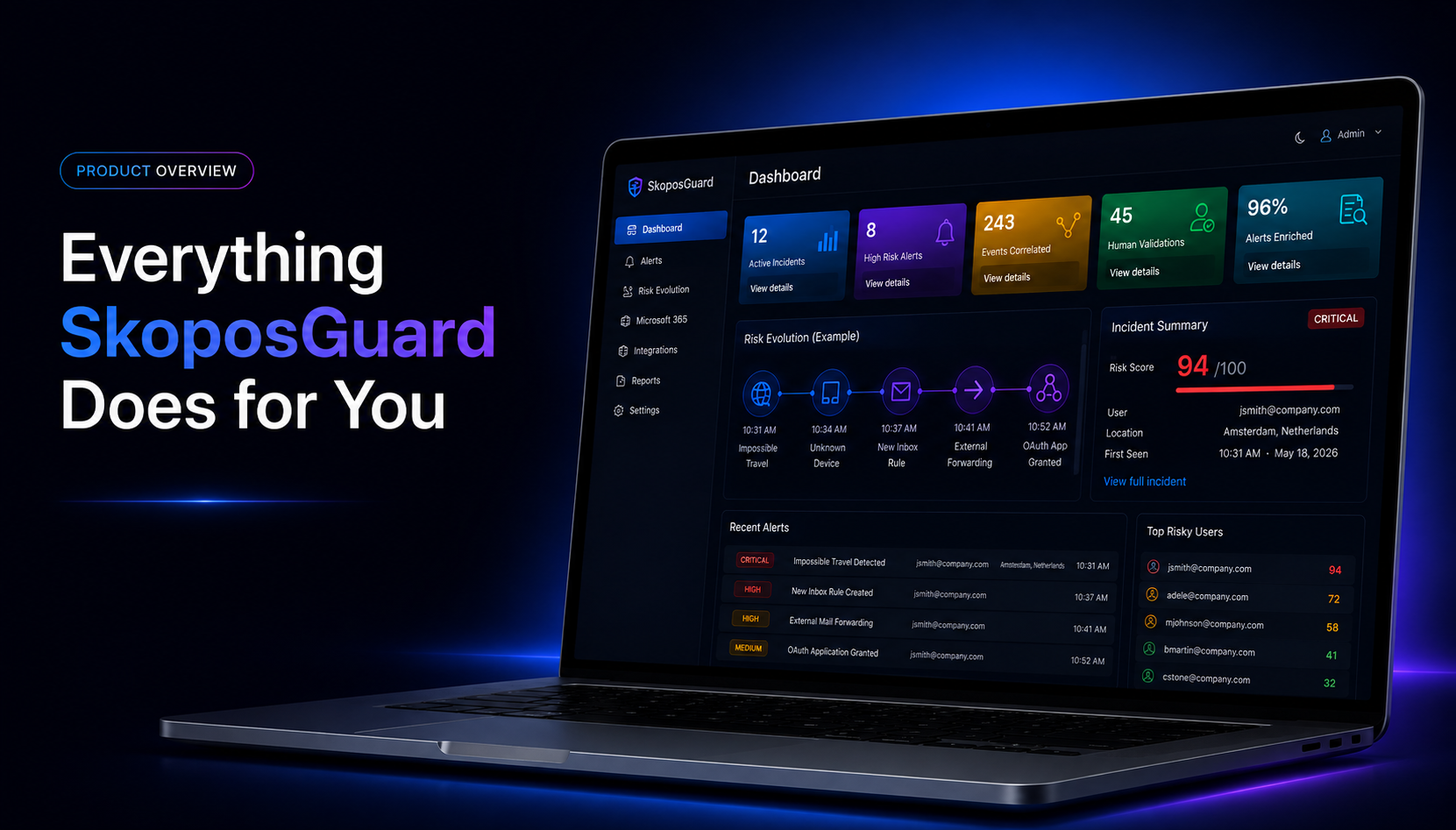
One platform. Complete visibility. Smarter security.
SkoposGuard brings together security data from Microsoft 365, identity, endpoint protection, DNS security, authentication platforms, and other security systems to provide MSPs and security teams with a centralized view of their customers’ security environments.
Rather than simply collecting alerts, SkoposGuard helps detect suspicious activity, add context, correlate related events, understand how risk evolves, validate activity with users, and transform security data into actionable intelligence.
Identity & Sign-In Security
Detect suspicious authentication activity before it becomes an incident.
Identity is one of the most common entry points for modern attacks. SkoposGuard continuously analyzes authentication and sign-in activity to identify behavior that may indicate compromised credentials or unauthorized access.
Impossible Travel Detection
SkoposGuard identifies authentication events occurring from geographically distant locations within a timeframe that would make physical travel unlikely.
Instead of relying solely on geographic distance, the platform can use additional context such as IP history, device information, authentication activity, and previous user behavior to help analysts determine the actual level of risk.
Sign-Ins Outside the United States
Identify successful authentication activity originating outside the United States for organizations whose users are normally expected to authenticate domestically.
New Country Login Detection
Identify when a user authenticates from a country that has not previously been associated with their account.
This provides additional context even when the location itself is not inherently suspicious.
Failed Login Monitoring & Spikes
Monitor repeated authentication failures and unusual increases in failed login attempts that may indicate password spraying, brute-force activity, outdated credentials, or other authentication problems.
MFA & Authentication Visibility
Gain visibility into authentication requirements and MFA activity to better understand how access was granted and whether additional authentication controls were involved.
Device-Aware Login Analysis
Device information can provide critical context during an investigation.
SkoposGuard can use device information to distinguish activity involving known or registered devices from authentication attempts originating from previously unknown devices.
IP & Location Analysis
Authentication events can be enriched with IP and geographic information to help analysts quickly understand where activity originated and whether the infrastructure has previously been associated with the user.
Microsoft 365 Threat Detection
Detect suspicious activity that may indicate account compromise.
A successful login is often only the beginning of an attack.
After obtaining access to a Microsoft 365 account, attackers may manipulate mailbox settings, establish persistence, grant application permissions, access sensitive information, or modify administrative privileges.
SkoposGuard monitors Microsoft 365 activity for behaviors that may indicate these actions.
Suspicious Inbox Rules
Detect newly created or modified inbox rules that could be used to hide messages, delete security notifications, move communications to unusual folders, or otherwise manipulate the victim’s mailbox.
External Mailbox Forwarding
Identify mailbox forwarding configurations that may cause messages to be delivered to external addresses.
Unauthorized forwarding can provide an attacker with continued access to communications even after account credentials have been changed.
OAuth Application Grants
Monitor application grants and consent activity that may provide third-party applications with access to organizational resources.
Administrative Role Changes
Detect changes involving privileged or administrative roles that could significantly increase the impact of a compromised account.
eDiscovery Activity
Monitor eDiscovery-related activity and unusual spikes that could indicate attempts to locate or access large quantities of organizational information.
Microsoft Security Alerts
Centralize relevant Microsoft security alerts within SkoposGuard so analysts can review Microsoft detections alongside other security evidence.
Risky Users & Identity Protection
Bring identity-risk information into the broader security investigation to help identify users exhibiting elevated risk.
Microsoft 365 Audit Visibility
Search, investigate, and understand Microsoft 365 activity.
SkoposGuard collects and organizes Microsoft audit activity to provide centralized visibility across customer environments.
Instead of moving between multiple portals during an investigation, analysts can review relevant activity directly within the platform.
Capabilities include:
- Microsoft Unified Audit Log collection
- Authentication activity
- Administrative activity
- User activity
- Microsoft 365 security events
- Audit log search and analysis
- Historical security investigation
- Continuous audit monitoring
This historical information becomes particularly valuable when investigating an incident because analysts can examine what occurred before and after the original detection.
Risk & Incident Intelligence
Turn individual events into a complete security story.
Security tools can generate large numbers of individual alerts. The challenge is determining which events matter and whether multiple detections are actually part of the same attack.
SkoposGuard adds context and correlation to help analysts understand the bigger picture.
Correlated Security Events
Connect related activity across users, identities, devices, and security platforms.
Rather than treating every detection as an isolated alert, SkoposGuard can associate related events to identify higher-confidence security incidents and reduce alert noise.
Risk Evolution
Follow how suspicious activity develops over time.
Risk Evolution provides a chronological view of related security events, allowing analysts to understand whether an initial low-risk event eventually developed into something more significant.
Attack Timelines
Reconstruct the sequence of activity surrounding a potential incident.
Understanding what happened before and after an alert helps analysts determine scope, severity, and potential attacker objectives.
Automated Incident Enrichment
SkoposGuard can automatically add relevant information to detections, including:
- IP information
- Geographic location
- Previous user activity
- Device information
- Authentication details
- Related Microsoft 365 activity
- Associated security detections
The result is an alert with significantly more investigative context before an analyst begins reviewing it.
Security Risk Scoring
Context and correlated activity can be used to help distinguish isolated anomalies from higher-risk sequences of events.
From Alert to Verified Incident
Security events rarely tell the complete story by themselves.
Consider a single Impossible Travel detection.
On its own, it may simply be caused by a VPN.
But what happens when additional activity appears?
Impossible Travel
↓
Unknown Device
↓
New Inbox Rule
↓
External Mailbox Forwarding
↓
Suspicious OAuth Grant
Individually, these events may generate several separate alerts.
Together, they tell a very different story.
SkoposGuard connects those signals to provide analysts with a clearer understanding of the potential incident.
Correlate
Connect related security events.
Identify relationships between activity involving users, identities, devices, and integrated security platforms.
Enrich
Automatically add investigative context.
Add IP history, location, authentication details, device information, and related activity.
Understand
See how the risk evolves.
Use Risk Evolution and attack timelines to understand the sequence and progression of suspicious activity.
Validate
Add human context when it matters.
When appropriate, SkoposGuard can interact directly with the affected user to determine whether suspicious activity was legitimate.
This additional layer of validation can help reduce false positives and accelerate incident response.
From visibility to detection. From detection to context. From context to action.
Human Validation
Sometimes the fastest way to validate activity is to ask the person involved.
Security logs provide technical evidence, but they do not always provide the full context.
For selected security events, SkoposGuard can contact users and request confirmation of suspicious activity.
This allows security teams to combine machine-generated evidence with human context.
A suspicious authentication could quickly be identified as legitimate travel, VPN usage, or expected activity.
Alternatively, a user indicating that they do not recognize the activity can provide an immediate signal that further investigation or response is required.
The objective is simple:
Reduce false positives while helping analysts identify real incidents faster.
Security Integrations
Bring security data together.
Modern organizations rely on multiple security products, each providing a different part of the security picture.
SkoposGuard centralizes information from multiple security platforms so MSPs can analyze activity with broader context.
Current capabilities include integrations with:
Microsoft 365 & Entra ID
Identity, authentication, audit, administrative, and security activity.
SentinelOne
Endpoint security information provides additional visibility into activity occurring on protected devices.
Cisco Umbrella
DNS and web-security information adds network-level context to security monitoring and reporting.
Duo Security
Authentication and MFA information provides another layer of identity context.
Cross-Platform Security Correlation
The long-term value of these integrations extends beyond displaying information from different products.
SkoposGuard can use signals from multiple security layers to help analysts understand whether seemingly unrelated events may actually belong to the same incident.
Reporting & Security Posture
Turn security data into information customers can understand.
Security monitoring should provide more than alerts.
SkoposGuard transforms collected security information into reports that help MSPs demonstrate security activity, identify trends, and communicate security posture to customers.
Reporting capabilities include:
- Security posture monitoring
- Monthly security reporting
- Executive Summary reporting
- Microsoft 365 security reporting
- Integration-specific reports
- Cisco Umbrella reporting
- Duo reporting
- SentinelOne reporting
- Security trends
- Risk Evolution reporting
- Authentication and identity trends
- Security activity metrics
This provides both technical teams and decision-makers with information appropriate to their roles.
Built for Multi-Tenant Security Operations
One place to monitor security across multiple customers.
SkoposGuard is designed around the operational requirements of MSPs and security teams responsible for multiple organizations.
Instead of treating every customer as an isolated collection of security portals, SkoposGuard provides centralized visibility and consistent security monitoring across environments.
This allows analysts to spend less time switching between tools and more time understanding and responding to actual security risks.
See the Full Security Picture
Security incidents rarely exist within a single product.
An identity anomaly may be followed by a Microsoft 365 configuration change. Endpoint activity may provide additional evidence. DNS activity may reveal suspicious communications. MFA information may help determine how access was obtained.
SkoposGuard brings those signals together.
Monitor. Detect. Correlate. Investigate. Validate. Report.
One platform designed to help MSPs transform security data into actionable security intelligence.